
Everything about Nushishi Exams
How students sit the exam, how you manage it, and what keeps it fair. Jump to what you need.
For your students
Simple for the candidate.
One link. Their own code. Clear instructions. Focus on answering.
- They open the link and type their personal code. No account, no password, no app.
- They check the name on screen is theirs, then start.
- One question at a time, with the clock in view.
- If the network drops, answers wait on the phone and are sent when it returns.
No complicated setup. No unnecessary steps.

Your students, already on a list
Bring the register you already have.
Upload your class list once, from Excel, CSV, Word or PDF, or paste it. You check how we read it before anything is saved.
- Only students on your list can sit the exam. Anyone else is refused.
- Every student gets one permanent personal code, for every exam, term after term.
- Hand out printed slips, or send the codes by email or text message.
- Next term, upload the new list. Existing students keep their codes.
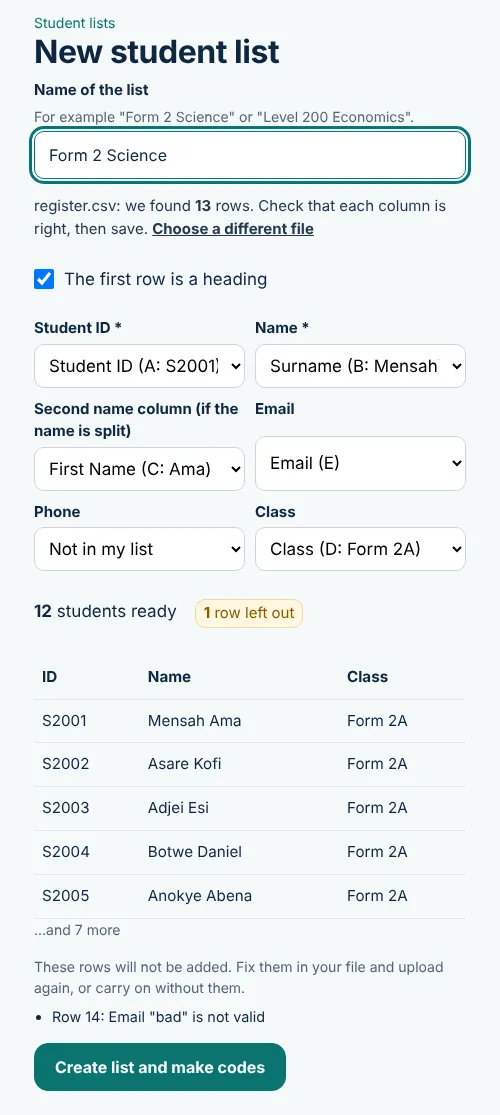
Check the columns before you save. Sample data.
Start to finish
How it works
Two different experiences: yours as the examiner, and your students'.
You, the examiner
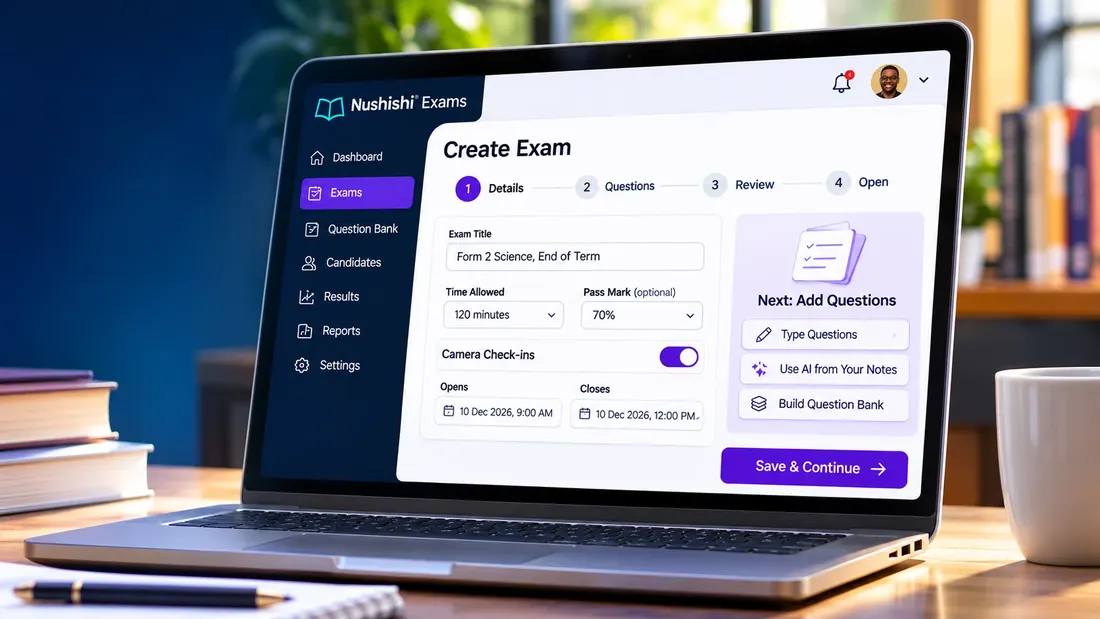
- Create. Title, time allowed, pass mark, camera on or off.
- Add questions. Type them, or paste your notes and let AI draft them for you to review.
- Choose who can sit. Your student list, or anyone with the exam code.
- Open. Share the link.
- Watch it live. Who started, who finished, who needs attention.
- Close, then release. It is already marked. Students see their result only when you release it.
Your students
- Receive the link and their personal code.
- Enter the code and confirm their name.
- Answer one question at a time against the clock.
- Submit. It also submits itself when time runs out.
- See the result on their own page once you release it.
Live monitoring
You stay in control.
See who has started, who has finished and what needs attention while the examination is running. The screen updates by itself.
- Counters for students, started, finished and completion.
- A progress bar for every student.
- Warnings when someone leaves the exam page, exits full screen, pastes or goes offline.
- A list of students who have not started yet.
- With camera check-ins on, review each student’s photos.
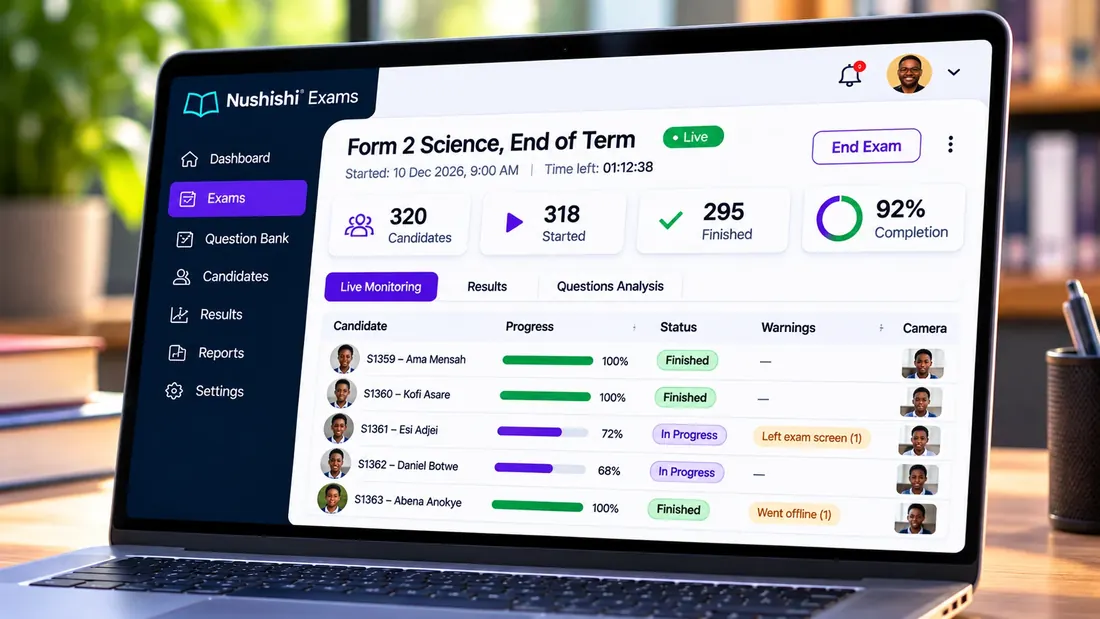
Live monitoring. Sample data.
Set it up
Build the examination your way.
Set your questions, rules and conditions before you open it to candidates.
- Everyone gets the same questions, each in a different order with the answer options shuffled. Or give each student a random draw from a bigger bank.
- One attempt per student, a timer that runs on our server, and no going back.
- Set an opening and closing time.
- Marking is automatic against your answer key.
- Keep your questions in a bank and reuse them every term.
- Start the exam yourself in a hall or lab: students check in and wait until you press Start.
- Writing on paper? Print question papers in versions A, B and C with a separate answer key.
Results
Results without the waiting.
See performance as examinations are completed, and where candidates did well or struggled.
- Passed, failed, pass rate, average, highest and lowest.
- A score distribution chart.
- How each question went, so you can spot an unfair or unclear question.
- Each student’s score, with warnings. Download everything as a spreadsheet.
- You choose when students see their results.
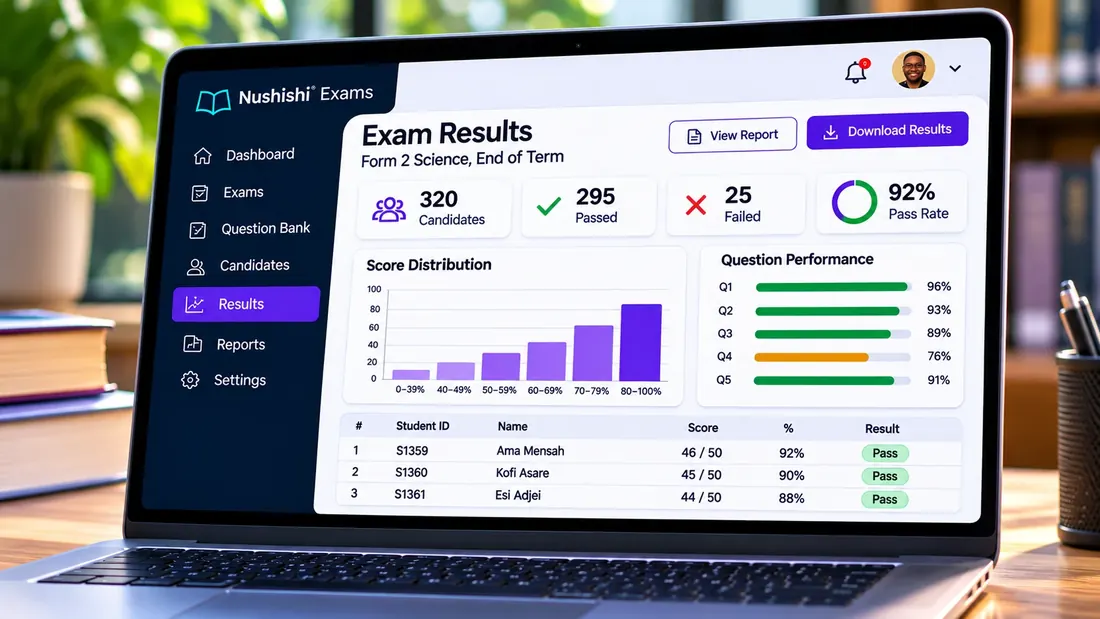
Results. Sample data.
Fair by design
Fair and secure
One attempt
Each student gets one try. If something genuinely went wrong, you can reset that student.
Shuffled for each student
Question order and answer options differ per person, so copying a neighbour's "C" does not work.
A clock they cannot change
The timer runs on our server, not on the phone.
Only listed students
With a student list, someone who is not on it cannot get in.
Optional camera check-ins
With the student's agreement, a photo at the start and about once a minute. Only you see them, and they are deleted automatically.
Activity warnings
Leaving the page, leaving full screen, copying, pasting and going offline are recorded for you.
An honest note. No online exam taken without supervision can be made completely cheat-proof. Nushishi makes cheating hard and visible. For high-stakes exams, run it in a hall or computer lab with an invigilator.
Beyond the classroom
Built for more than school tests.
Course tests and continuous assessment, staff compliance checks, training assessments, entrance and scholarship tests, and professional competency checks.

Schools
Term, mock, entrance and class tests.

Universities and colleges
Course tests and continuous assessment.

Professional institutions
Competency and certification assessments.

Corporate training
Staff, compliance and skills assessments.
Ready to run your first exam?
Your first exam is free, up to 20 students.